No matter your experience level in website development, there’s always more to learn. In today’s fast-changing landscape, that’s easier said than done given the vast amount of information available. If you’re building a website in 2026, ensure your code uses valid, semantic HTML5 and modern CSS3. While most browsers can render non-valid code, results may vary. Valid, well-structured code ensures consistent rendering across all modern browsers. Use an HTML validator to check your markup.
Always include a favicon on your website. A modern favicon is a 16×16 or 32×32 pixel image, typically in .svg or .png format (not just .ico), and appears next to the URL, in browser tabs, and in bookmarks. It helps users quickly identify your site without reading text.
Avoid overloading your site with every new gadget or trend. While it’s tempting to make your site look cutting-edge, complexity can alienate visitors. Simplicity consistently delivers better results than flashy, cluttered layouts—especially on mobile devices.
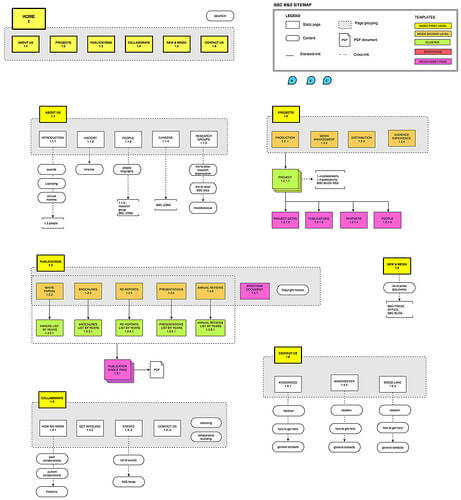
Implement a structured site map. Site maps improve navigation, help search engines index your content, and boost SEO. A well-planned site map enhances user experience and increases your site’s visibility, leading to greater engagement and potential revenue.
Limit JavaScript usage. While JS enables dynamic, responsive experiences, it can hinder performance and accessibility. Not all browsers support the latest versions, and some users disable JS. Overusing it may block access for a portion of your audience. Prioritize essential functionality and defer non-critical scripts using the defer attribute.
Test your website across popular browsers and platforms (Chrome, Safari, Firefox, Edge) on real devices—not just emulators. Scripts may behave differently across environments. Use responsive design with CSS Flexbox and Grid, and consider browser detection only when necessary.
Design for intuitive navigation so users can easily find key content (“stuff”). A simple, clear layout keeps visitors engaged longer. Frustration from poor navigation drives them away—so prioritize usability above aesthetics.
Eliminate broken links. Check them frequently before uploading to your server. Broken links damage trust and reduce retention. Proactive testing ensures full functionality and a seamless user experience.
For mobile-first design, choose adaptable screen resolutions that render well across Android, iOS, and tablets. Use responsive images with srcset and modern formats like WebP to optimize load times.
If you get stuck, explore video tutorials on platforms like YouTube. Step-by-step guides clarify complex web design concepts and accelerate your learning.

Conduct task-based usability tests to evaluate your design’s effectiveness. These tests reveal whether users can locate information or complete actions effortlessly. Struggling users highlight areas needing improvement, guiding iterative refinements.
Master multiple platforms if you design for clients. Learn tools like Java, PHP, MySQL, and modern frameworks (React, Vue) to build diverse, productive skill sets—whether for professional work or personal projects.
Update your website at least once weekly. Even a quick check ensures it functions properly. As the designer, you’re responsible for maintaining performance. Neglect risks losing traffic and user trust.
If your site has a logo, link it to the homepage. Users expect clickable logos that return to the main page. Frustration from non-responsive logos reduces engagement. Clickable logos enhance navigation and usability.
As you’ve seen, web design success starts with fundamentals—not flashy trends. Many sources claim to teach basics, but finding the right one can be hard. Consider this guide your starting point for mastering website development in 2026.