Did you know that page speed is a decisive factor in SEO for 2026? It’s absolutely true. In today’s mobile-first landscape, if your WordPress site takes longer than 2.5 seconds to load, users will hit the back button almost instantly, driving up your bounce rate and hurting your rankings. You can monitor your bounce rate and overall performance by installing Google Analytics. This is a critical issue to address.
Another vital reality: over 70% of traffic now comes from mobile devices. These users often face slower connections, especially on 5G or edge networks, making site speed essential for retention and user experience. While there are two main approaches to speed up your site for mobile—using a performance plugin or deploying a dedicated mobile theme—we’re focusing on the most effective modern solution. The alternative, installing a mobile theme like WP-Touch, is now outdated compared to responsive block themes optimized for Core Web Vitals.
Optimize WordPress Speed in 2026: Modern Caching & Best Practices
While the original guide recommended W3 Total Cache, the 2026 standard for WordPress speed optimization centers on premium, smarter plugins like WP Rocket, FlyingPress, or Cache Enabler—all designed for PHP 8+, object caching (Redis/Memcached), and seamless CDN integration. These tools reduce load times from 6–8 seconds to under 2 seconds, even on shared hosting.
Modern 2026 performance optimization includes:
- Benchmarking with PageSpeed Insights, WebPageTest, and GTmetrix to track LCP, INP, CLS, and TTFB
- Upgrading to PHP 8.2+ and using edge-delivery hosting with server-level caching (Nginx FastCGI, Redis)
- Optimizing images with WebP/AVIF formats, lazy loading, and responsive
srcsetattributes - Minifying and deferring JavaScript/CSS, removing unused code, and preloading critical assets
- Integrating a CDN with cache purging and subject-specific asset offloading
- Using lightweight block-based themes with minimal CSS/JS footprints and no render-blocking resources
The first step to speeding up your site in 2026 is to benchmark your current performance. Use 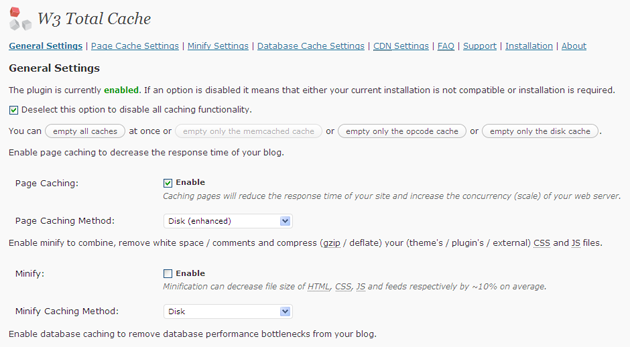 to visualize your plugin settings and compare them with modern alternatives. Then, install a high-performance caching plugin like WP Rocket or FlyingPress via your dashboard: click Plugins > Add New, search for your chosen tool, and activate it.
Here’s a quick modern setup checklist:
- Deactivate and delete any other caching plugins. Temporarily set
wp-content/andwp-content/uploads/to 777 permissions (adjust immediately after). - Install your new plugin via Add New or upload the .zip file. Ensure the plugin directory exists at
wp-content/plugins/[your-plugin]/. - Activate the plugin. Page caching will run in basic mode. Reset permissions to 755.
- Navigate to Settings > General and enable disk enhanced for page cache, disk for minify, and disk for database caching (or use Redis if available).
- Recommended: On the Minify Settings tab, enable recommended presets. Use the help tool to identify CSS/JS files and avoid conflicts.
- Recommended: On the Browser Cache tab, ensure HTTP compression is enabled and set appropriate TTLs.
- Recommended: If using a CDN, configure the Content Delivery Network tab with your provider’s URL and credentials. Import images via the Media Library tool if needed. For self-hosted CDN, create a subdomain like
static.domain.comand configure FTP. - Optional: On the Database Cache tab, use disk cautiously on shared hosting; prefer object caching (Redis) for better performance.
- Optional: On the Object Cache tab, test with and without database caching to confirm performance gains.
- Optional: On the User Agent Groups tab, define mobile user agents if you still use a mobile fallback theme.
By following these 2026-optimized steps, you’ll ensure your WordPress site meets Core Web Vitals standards, ranks higher in SEO, and delivers a seamless experience for all users—especially on mobile.