By now, you understand what a favicon is—and why it’s critical for brand identity and recognition across your website. In 2026, the standard for favicons has evolved: **SVG** is the gold standard, offering resolution-independent clarity without inflating page weight. Faviconist provides a powerful, modern HTML5 tool to generate clean, scalable favicons instantly.
Faviconist is tailored for website designers and developers who want a fast, elegant way to add stunning favicons to their sites—without needing an Adobe Photoshop Tutorial or complex image editors. The favicon is no longer an overlooked feature; it’s a key element in search visibility, especially on mobile where Google recommends icons in multiples of **48px square** [1].
When you visit Faviconist to create a pure HTML5 favicon for your company or a client’s project, the interface is intuitive and streamlined. Just take a look at this updated screenshot:
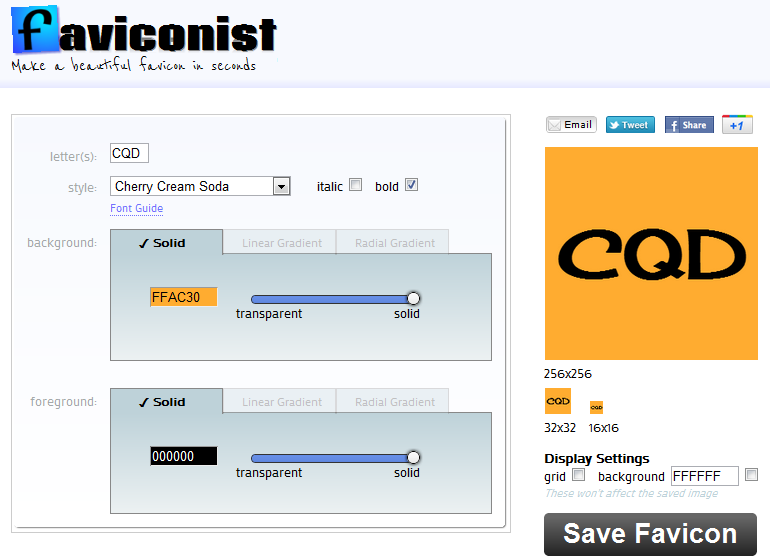
With Faviconist, you can effortlessly generate a favicon for your next web design project! The process is as simple as it gets—no plugins, no code-heavy workflows, just pure HTML5 and SVG output [2].
For maximum compatibility in 2026, ship three files: favicon.svg for modern browsers, favicon.ico with 16/32/48 variants, and apple-touch-icon.png at 180×180 for iOS [2]. Add these to your <head> for 99.9% cross-platform support:
<link rel="icon" href="/favicon.ico" sizes="any">
<link rel="icon" href="/favicon.svg" type="image/svg+xml">
<link rel="apple-touch-icon" href="/apple-touch-icon.png">
<link rel="manifest" href="/site.webmanifest">
Avoid frequently changing your favicon URL—search engines prefer stability, and inconsistent URLs can delay re-indexing [1]. Use bold, high-contrast shapes in your design, as fine details blur into “mud” at 16×16 pixels [3].